Best Practices for a Business Website in 2026

Best Practices for a Business Website in 2026

Best Practices for a Business Website in 2026

Your website is no longer just a digital brochure—it’s your primary salesperson, customer support rep, and brand ambassador rolled into one. In 2026, expectations are higher than ever. Users want speed, clarity, trust, and personalization, while search engines and regulations demand transparency, accessibility, and performance.

Here are the best practices businesses should follow to build (or refresh) a website that actually works in 2026.

1. Design for Intent, Not Just Aesthetics

Beautiful design still matters—but only when it supports user intent.

In 2026, the most effective business websites:

  • Make the next step obvious within 3–5 seconds
  • Use clear visual hierarchy and generous spacing
  • Eliminate clutter and unnecessary animations
  • Prioritize scannability over long blocks of text

Every page should answer three questions instantly:

  1. What do you offer?
  2. Who is it for?
  3. What should I do next?

If users have to think, you’re losing them.

2. Performance Is Non-Negotiable

Speed is no longer a “nice to have.” It’s table stakes.

Best-in-class sites in 2026:

  • Load in under 2 seconds on mobile
  • Use modern image formats and adaptive loading
  • Minimize scripts and third-party bloat
  • Are optimized for real-world devices, not just desktops

Performance directly impacts conversions, SEO visibility, and perceived brand credibility. A slow site signals a slow business.

3. Mobile-First Is the Default

Designing for desktop first is officially outdated.

Modern business websites:

  • Are built mobile-first, then enhanced for larger screens
  • Use touch-friendly navigation and buttons
  • Avoid intrusive pop-ups that hurt mobile usability
  • Ensure forms are simple and thumb-friendly

If your mobile experience feels like a compressed desktop site, it’s time for a rethink.

4. Accessibility Is a Business Requirement

Accessibility isn’t just about compliance—it’s about reach, usability, and trust.

In 2026, best practices include:

  • Proper color contrast and readable typography
  • Keyboard-navigable menus and forms
  • Descriptive alt text for images
  • Clear labels and error messages for inputs

Accessible websites perform better for everyone, including users on slow connections, older devices, or assistive technologies.

5. Trust Signals Matter More Than Ever

With AI-generated content everywhere, users are more skeptical—and more discerning.

High-trust business websites:

  • Clearly show who’s behind the company
  • Feature real testimonials, case studies, and logos
  • Display transparent pricing or expectations
  • Include privacy, security, and data-usage clarity

Trust is built through consistency, honesty, and human presence—not hype.

6. Smart Personalization (Without Being Creepy)

Personalization in 2026 is subtle, helpful, and respectful.

Effective examples include:

  • Content tailored by industry or use case
  • Location-aware messaging (when appropriate)
  • Remembered preferences for returning visitors
  • Adaptive CTAs based on user behavior

The goal is relevance, not surveillance. If personalization feels invasive, it backfires.

7. SEO Is About Experience, Not Tricks

Search engines now prioritize usefulness over keyword manipulation.

Modern SEO best practices focus on:

  • Clear site structure and internal linking
  • Content that genuinely answers user questions
  • Fast load times and mobile usability
  • Structured data for clarity and context

If your content is helpful to humans, it’s usually helpful to search engines too.

8. Content Should Be Clear, Human, and Action-Oriented

Corporate jargon is officially dead.

Winning websites in 2026:

  • Write in plain, confident language
  • Focus on benefits, not buzzwords
  • Use short paragraphs and clear headings
  • Guide users toward action on every page

Your content should sound like a knowledgeable human, not a legal document or AI experiment.

9. Security and Privacy Are Visible Features

Users expect websites to protect them—and to prove it.

Best practices include:

  • HTTPS everywhere
  • Minimal data collection
  • Clear cookie and privacy controls
  • Visible security reassurance without fear-mongering

Respecting user data is part of respecting your customer.

10. Continuous Improvement Beats One-Time Launches

The best business websites are never “done.”

In 2026, smart teams:

  • Track user behavior and conversion paths
  • Regularly test headlines, layouts, and CTAs
  • Update content based on real questions and feedback
  • Treat the website as a living product

Iteration beats perfection every time.

Final Thoughts

A great business website in 2026 is fast, accessible, trustworthy, and relentlessly focused on the user. It blends strong design with technical excellence and human clarity—while staying flexible enough to evolve.

If your website helps users achieve their goals effortlessly, it will help your business achieve its own.

That’s the real best practice.

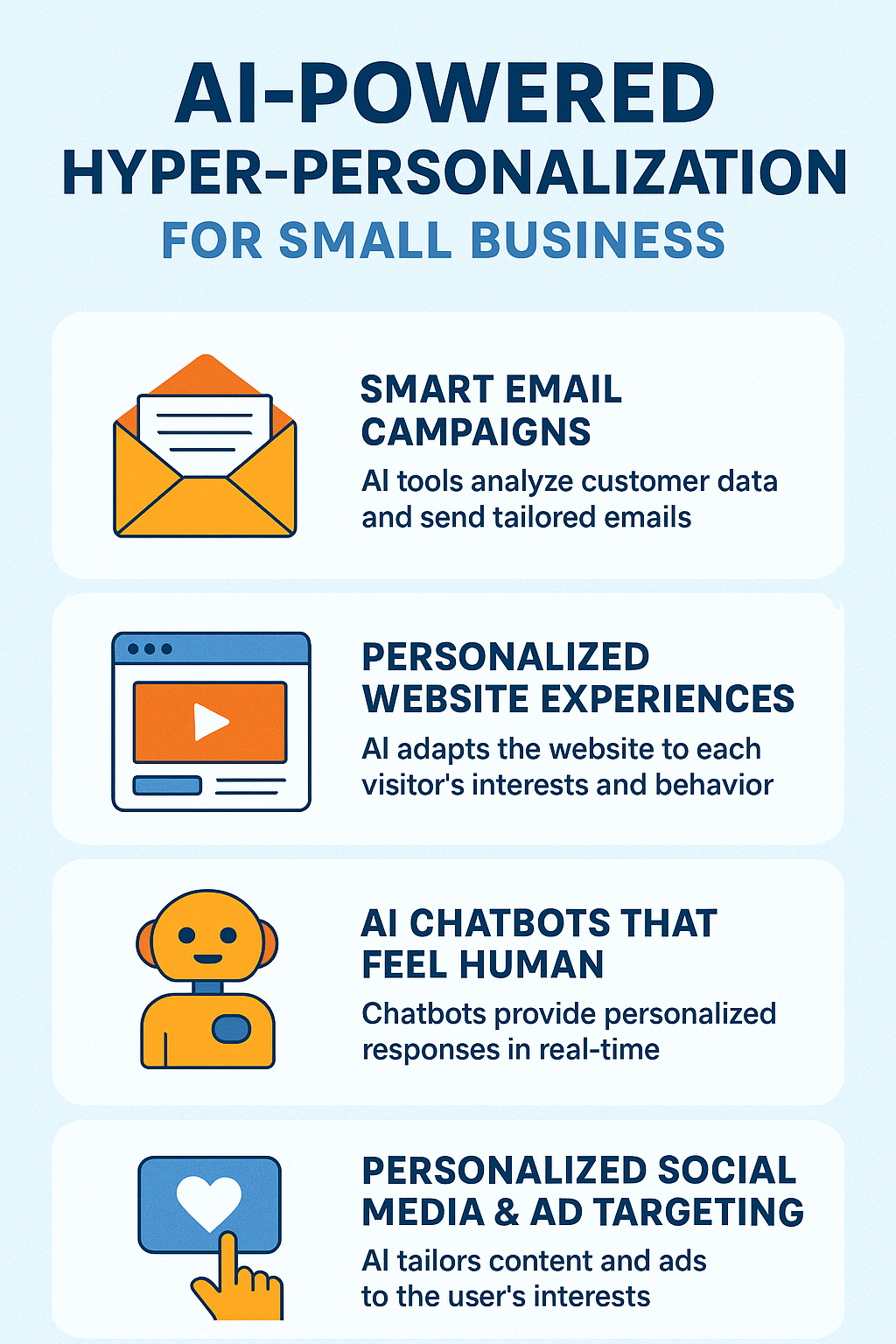
Leverage AI-Powered Hyper-Personalization to Boost Business Growth

Leverage AI-Powered Hyper-Personalization to Boost Business Growth

Customers expect more than generic marketing messages — they want communication that feels relevant, timely, and tailored to their specific needs. For small businesses, this used to be difficult without large teams or complex data systems.

AI-powered hyper-personalization is a game changer, allowing  small businesses to deliver big-brand experiences with small budgets.

Below, we break down what hyper-personalization is, why it matters, and how local businesses can start using AI to attract more customers, increase sales, and build stronger loyalty.

What Is AI-Powered Hyper-Personalization?

Hyper-personalization goes beyond simply using a customer’s name. It uses AI, machine learning, and real-time data to understand customer behaviors, interests, and intent — then delivers content or offers uniquely suited to them.

With the help of AI tools, small businesses can personalize:

  • Emails

  • Website experiences

  • Product recommendations

  • Social media messages

  • Ads

  • SMS and chatbot interactions

The result? Marketing that feels like a 1:1 conversation — at scale.

Why Hyper-Personalization Matters for Small Businesses

1. Higher Engagement

Personalized content gets more clicks, opens, and responses because it matches what customers actually care about.

2. Better Conversions

When customers receive offers based on their browsing, purchase history, or interests, they’re far more likely to buy.

3. Improved Loyalty

Personalized communication helps small businesses build trust and long-term relationships — a huge advantage over larger, less human brands.

4. Time Savings

AI handles heavy data lifting automatically, giving owners and small teams more time to run the business.

Ways to Use AI-Powered Hyper-Personalization (Even with a Small Budget)

1. Smart Email Campaigns

AI tools can analyze your customer list and automatically send tailored emails based on:

  • Past purchases

  • Seasonal interests

  • Engagement history

  • Customer behavior on your website

Examples:

  • A bakery sends “Buy One Get One” offers to customers who regularly buy treats.

  • A salon sends personalized reminders based on each customer’s typical appointment cycle.

2. Personalized Website Experiences

AI-driven website tools can adapt content for each visitor.

Examples:

  • Show products similar to what a visitor viewed last time.

  • Promote local events or services based on location.

  • Offer coupons to returning customers who haven’t purchased recently.

Even small businesses using Shopify, WordPress, or Squarespace can integrate these tools easily.

3. AI Chatbots That Feel Human

Modern chatbots do far more than answer FAQs — they analyze behavior and personalize responses in real time.

Uses include:

  • Offering product recommendations

  • Booking appointments

  • Guiding shoppers to the right service

  • Following up with tailored messages

This creates a 24/7 sales assistant without added staffing costs.

4. Personalized Social Media & Ad Targeting

AI can help you tailor posts, captions, and offers by analyzing what your audience engages with most.

For ads, AI can automatically create:

  • Lookalike audiences

  • Interest-based segments

  • Dynamic ads showing the exact product someone viewed yesterday

This saves money and increases ROI.

5. Predictive Recommendations

AI can anticipate what customers might want next.

Examples:

  • A fitness studio recommends classes based on past attendance.

  • A boutique suggests outfits that match previous purchases.

  • A landscaping company sends seasonal service reminders tailored to each customer’s yard history.

Predictive personalization increases repeat business — one of the most valuable revenue drivers for small companies.

What Small Businesses Need to Get Started

You don’t need a tech team. You only need:

  • A CRM (customer relationship management system) or customer list

  • A data source (website analytics, email behavior, purchase history)

  • An AI tool (many are affordable or even free)

  • Clear goals — more leads, higher sales, better retention, etc.

Final Thoughts: AI Levels the Playing Field for Small Businesses

AI-powered hyper-personalization is no longer a luxury — it’s a competitive advantage. It helps small businesses deliver tailored experiences that keep customers engaged and loyal, all while saving time and costs.

When done right, hyper-personalization turns simple interactions into meaningful customer relationships — and meaningful relationships into increased revenue.

Leverage AI-Powered Hyper-Personalization to Boost Business Growth Infographic

Why Every Small Business Needs a Website (Even If You’re Not Tech-Savvy)

Why Every Small Business Needs a Website (Even If You’re Not Tech-Savvy)

In today’s digital-first world, a website is no longer a luxury — it’s a necessity. Whether you’re running a local bakery, a freelance service, or a boutique shop, having an online presence can make all the difference between being found and being forgotten.

And yet, many small business owners still operate without one, relying solely on word of mouth, social media, or foot traffic. If that sounds like you, here’s why it’s time to seriously consider building a website — even a simple one.

1. It Builds Credibility and Trust

Consumers expect businesses to have websites. In fact, research shows that most people won’t trust a business that doesn’t have one. A professional website instantly boosts your credibility and reassures potential customers that you’re legitimate, established, and serious about what you do.

Think of it this way: if someone hears about your business and Googles you but finds nothing — what message does that send?

2. It Keeps You Visible 24/7

Your physical location has business hours. Your website doesn’t.

A website allows customers to learn about your services, browse your products, and contact you any time — day or night. That’s particularly valuable in today’s fast-paced world where people often search for information outside of normal hours.

3. It Helps You Reach More Customers

Word of mouth is great — but it only goes so far. A website expands your reach beyond your local community. People can discover your business through search engines, social media links, and online directories. With even a basic SEO setup, you can attract new customers who are actively searching for what you offer.

4. It Showcases Your Brand and Personality

Your website is your space to tell your story. Unlike social media platforms, which limit how you present your brand, a website gives you full control. You can share your mission, values, team, services, testimonials, and anything else that sets you apart.

A great website not only informs — it connects.

5. It Drives Sales and Inquiries

Whether you sell products online, book appointments, or just want people to call you, your website can help convert interest into action. Add features like:

  • Contact forms

  • Online booking

  • E-commerce capabilities

  • Special offers or lead magnets

Even if you don’t sell directly online, a good website can move people closer to making a purchase or inquiry.

6. It Levels the Playing Field

The internet is the one place where small businesses can compete with big brands. A sleek, well-organized website can make your company look just as polished and professional as the big guys — without the massive budget.

Your Website Is an Investment, Not a Cost


A website isn’t just another expense — it’s one of the most valuable marketing tools you can have. It works for you 24/7, helps you reach more people, and builds long-term trust with your audience.

And the good news? You don’t need to be a tech expert to get started. Affordable website builders, freelancers, and digital agencies make it easier than ever for small business owners to create a site that looks great and performs even better.

Still waiting to launch your website? We’ve helped hundreds of businesses launch theirs. Your future customers are already searching — contact us to make sure they can find you.